
- Home
- Selected Work
- Ye-Almaz Dental Lab
Case study · Dental laboratory · Ethiopia
One connected operating system for a modern dental laboratory.
Ye-Almaz Dental Laboratory in Ethiopia runs reception, production, quality control, finance, dispatch and clinic communication on a single platform that Odontofusion designed and built. This page explains what it does, how the parts connect, and what a system like it could mean for another laboratory.
The challenge
A laboratory case crosses six teams.
A physical case moves from a clinic to reception, through production stations, quality control, billing and dispatch, then back to the clinic. Each handoff is a place where information can scatter.
- Case updates scattered across messages, paper and memory.
- Manual coordination between reception, production and dispatch.
- Limited visibility into where a case is, so clinics keep asking.
- Billing that depends on asking what was delivered and what was agreed.
- Handoff delays between production stages and at dispatch.
These are typical fragmentation problems for this kind of operation, not measured historical failures at Ye-Almaz.
System architecture
How the modules connect.
A case moves left to right through seven stages, all reading and writing shared records. Select a stage to see what it does.
Clinics submit orders (tooth selection, work type, shade, delivery speed) and follow every case’s live status and timeline from a mobile app. They can upload a payment screenshot or pay online, download invoices and redeem loyalty points.
Impressions that have arrived wait in an “Arrived at Lab” queue. Reception creates phone and walk-in cases, handles aligner cases with a tray-count selector, digital scan intake and remake or redo entries linked to the original case.
Reception reviews each arrived case and accepts it, rejects it, or flags it for review before it enters production.
Sixteen department stations from Reception to Quality Control. Technicians scan the case’s QR label and the status advances automatically. Accounts can be restricted to specific departments, and every scan is logged with time and person.
Scanning at Quality Control moves the case straight to “Ready to Dispatch”. Failed work is handled through free remakes or half-price redos linked to the original case.
The traffic-control centre between clinics and the laboratory: six tabs from “Place Order” to “Delivered”, driver assignment and reassignment, self drop-off and self pickup, phone orders, and cancelling or deleting orders that never should have existed.
Drivers see only their own pickups and deliveries for the day, confirm each collection and delivery, and can hand a job back to dispatch if it cannot be completed.
- Database
- Authentication and roles
- Case timeline and audit trail
- Finance
- Inventory
- Reports and exports
- Notifications
Drawn from the documented design of the system. Hosting and technology details are not published without client approval.
The software
The administrator’s view.
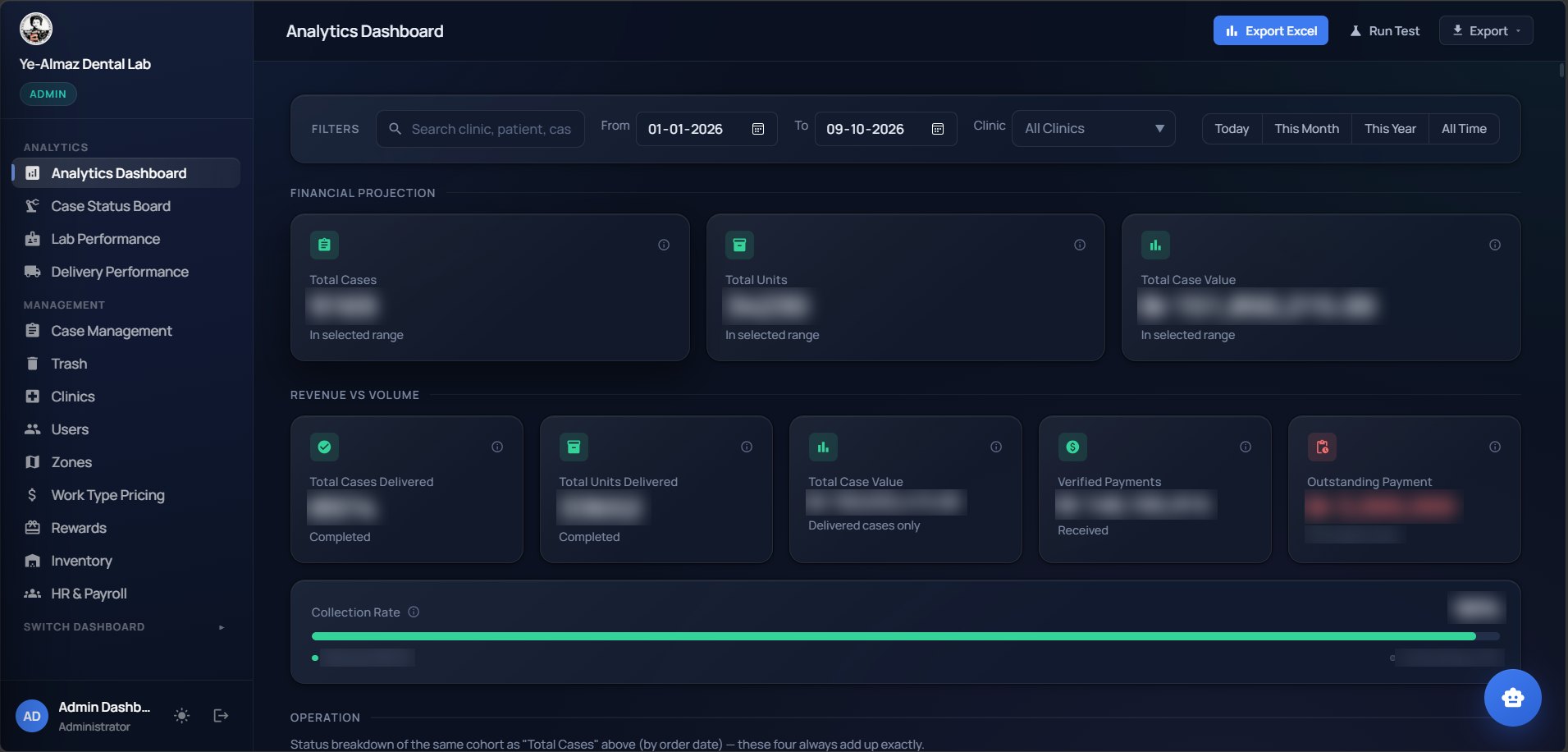
The administrator dashboard brings analytics, case status, lab and delivery performance, clinics, users, zones, work-type pricing, rewards, inventory and HR and payroll into one navigation. Financial figures in this screenshot are blurred for client confidentiality.
Other role dashboards, for reception, dispatch, drivers, lab technicians, inventory, HR and finance, show each team only what its job needs.
A case, step by step
Follow one case through the laboratory.
A fictional case, as the system would record it. Select a step to see what happens and who can see it.
- Clinic submits a case. A clinic creates an order in the mobile app: patient reference, tooth selection, work type, shade and delivery speed.
- Reception registers and validates it. When the impression arrives, Reception reviews it and accepts, rejects or flags it for review.
- A trackable identifier is generated. The case gets a QR label and a case number, and a timeline starts recording every event.
- Production teams receive the work. The case appears for the departments that handle it. Technicians see the stations they are allowed to use.
- The case moves between stages. A scan at each station records who handled the case and when, and advances the status. No one updates a spreadsheet.
- Quality checks are performed. Scanning at Quality Control releases the case: it moves to “Ready to Dispatch”.
- Finance processes the billing workflow. Payment verification, a Trusted Partner account or a free remake decides whether the case is cleared to go.
- Dispatch organises delivery. Dispatch assigns a driver, or records a self pickup. The driver sees the job in their own queue.
- The clinic receives the update. On confirmed delivery the case is marked complete and the clinic is notified. The invoice and timeline stay on record.
Fictional case and anonymised sample data. No real patient or clinic information.
Capabilities
Eight modules, one platform.
Case production
Order tracking from submission to delivery with QR scanning at each department station and a live timeline per case.
Quality control
Inspection checkpoint that releases cases to dispatch, with linked remake and redo handling.
Dispatch
Pickup and delivery coordination, driver queues and delivery confirmation.
Finance
Payment verification, invoicing and monthly billing for Trusted Partner clinics. Outstanding balances are visible at any moment.
Inventory
Materials and consumables with low-stock flags and usage recorded against cases.
HR and payroll
Staff records, attendance, leave and payroll processing, with lab technician activity feeding performance.
Analytics
One dashboard for revenue, production, staff and inventory, with Excel and PDF exports of any filtered list.
Clinics and rewards
Clinic accounts, pricing and loyalty points; points awarded for a pickup are reversed if the pickup is cancelled.
Roadmap, not claimed. Attendance-device integration and AI-assisted reporting are upgrade ideas. They are not described as delivered anywhere on this page.
Operational impact
What integration changes, as a scenario.
The effects below come from the efficiency simulator with a typical laboratory setup. They show how the mechanism works. They are not Ye-Almaz’s results.
Illustrative business model
Tracking visibility
Every case has a live status and timeline, so “where is it?” has one answer. Qualitative: not quantified here.
Billing turnaround
Delivered cases feed invoices and balances by clinic. Qualitative: depends on the clinic’s billing terms.
Dispatch coordination
Drivers work from their own queue and confirm each handover. Qualitative: measured per operation.
ROI for a laboratory like yours
Test the economics with your numbers.
A pre-set dental laboratory scenario. Change the inputs to match your own operation.
Open the full calculator with scenarios, sensitivity and a downloadable report
From connected operations to intelligent insights
An AI copilot on top of the same data.
Because every case, balance and dispatch lives in one database, an AI agent can answer operational questions without anyone building a report. This is how that would work safely.
Concept · roadmap A scripted walkthrough with fictional data. It shows the intended design, not a feature you can use today.
- Authorized userAsks on WhatsApp or the web interface.
- AI agentUnderstands the question and plans which approved tool to use.
- Authentication and permissionsChecks who is asking and what their role may see.
- Approved query toolsFixed, read-only queries. The agent never writes free-form database commands.
- Laboratory management databaseReached only through those tools.
- ResponseBuilt from the returned rows, with the request logged.
About the dental laboratory copilot Try more agent scenarios
Technical execution
What we can say publicly.
- Role-based dashboards and permissions: reception, dispatch, delivery, lab technician, inventory, HR, finance and admin.
- Lab technician accounts can be restricted to specific production departments.
- QR scanning with a device camera at every production station.
- Live updates across screens, and push notifications to the clinic mobile app.
- Excel and PDF export of any filtered list.
The technology stack, hosting arrangements and security details of a client system are published only with that client’s approval. We are happy to discuss architecture and security in a scoping call under confidentiality.
Could your business operate this efficiently?
Start with the numbers, then talk to the engineers who built it.